

SQLer: Probably Good Enough Tests
I needed to know if SQLer was fast enough for production workloads before I recommended it to anyone else. The benchmarks are reasonably designed, the graphs tell the right story, and the results line up with how SQLite behaves: expression indexes erase most performance differences on equality filters; normalized schemas win bulk updates; SQLer’s bulk_upsert competes on inserts; array membership wants an auxiliary table; concurrency hits SQLite’s single-writer ceiling.
TL;DR: SQLer performs predictably. Expression indexes make equality queries fast regardless of JSON depth. Bulk inserts are competitive. Updates favor normalized tables when touching many rows. Array searches need better patterns. Concurrency follows SQLite’s rules.
Microbench caution: Medians below ~0.1 ms are near timer/Python noise; treat sub-millisecond differences qualitatively (≈0 ms) rather than as precise decimals.
Equality Selects vs Size and JSON Depth
Figures:
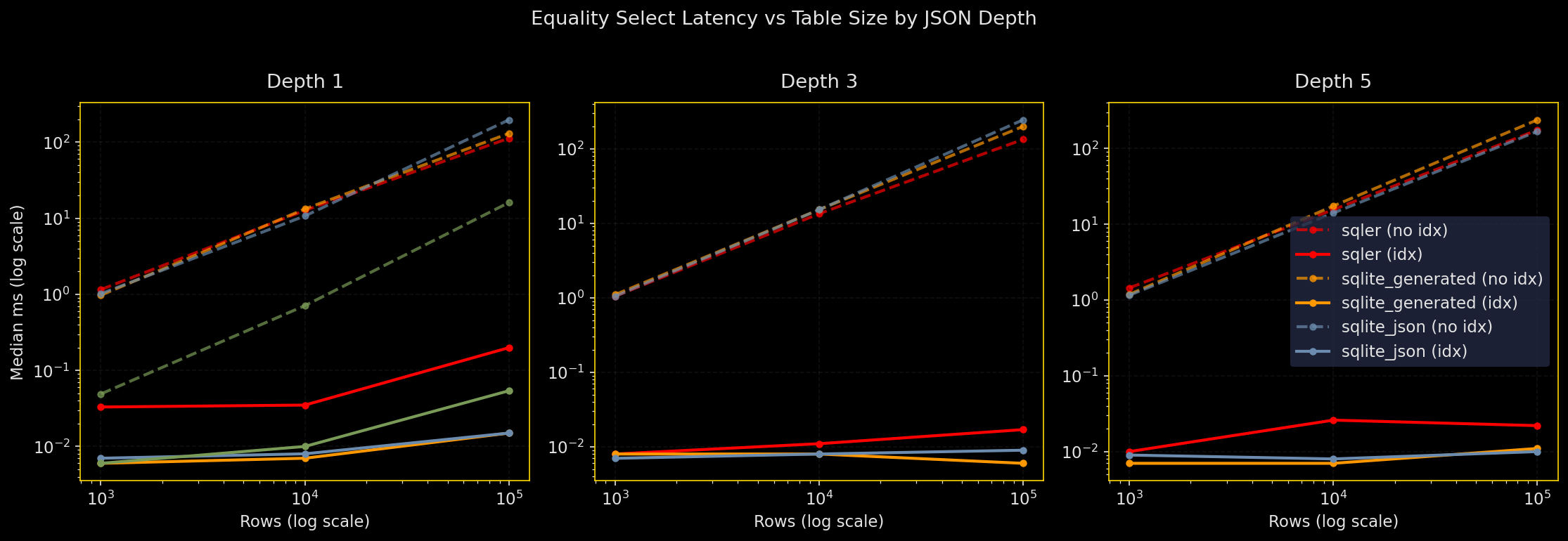
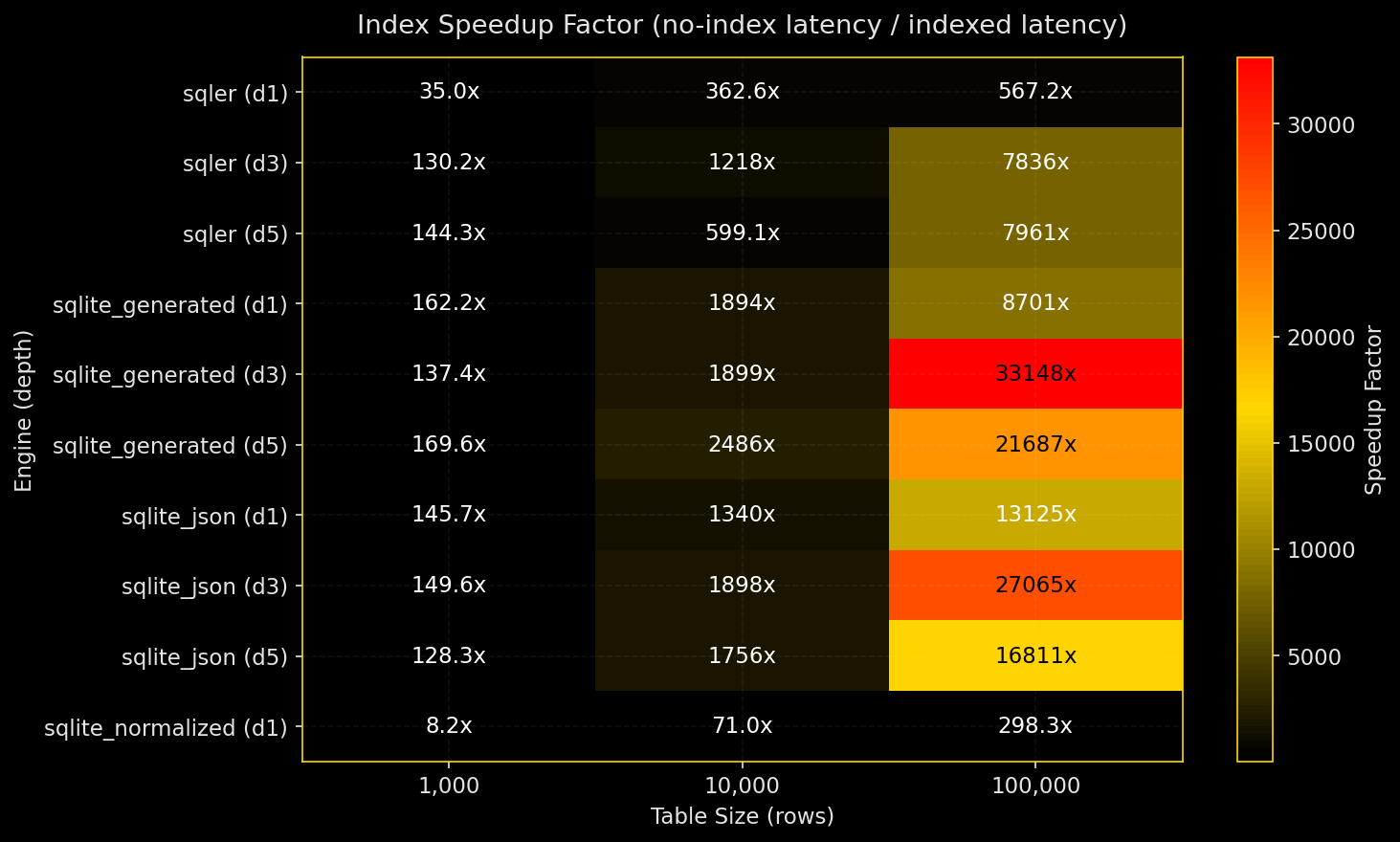
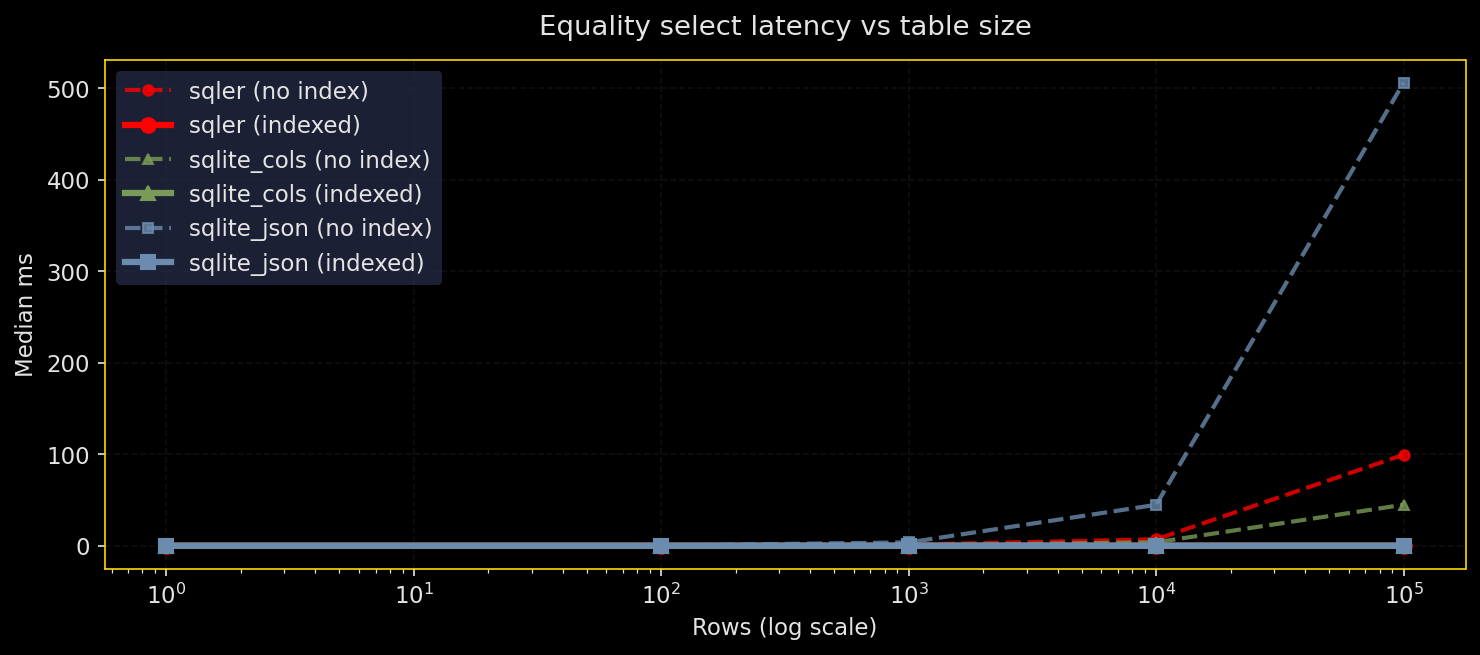
Why test this: Equality filters on JSON fields are the common case. How does SQLer compare to raw SQLite JSON and normalized columns as tables grow and JSON gets deeper?
What it does: Run the same equality predicate across row counts from 1K to 1M and JSON depths 1, 3, 5. Compare four engines: SQLer (JSON document table), raw SQLite JSON, SQLite with generated columns, and normalized scalar columns. Test with and without indexes. WAL mode, seeded RNG, warmed cache. Five runs, report median and p95.
Results:
- Expression indexes on the predicate path make equality queries fast across all engines
- Without indexes, normalized columns win; JSON path evaluation costs become visible at depth
- Deep JSON paths hurt most when there’s no index
- Index speedups range from dozens of times faster at small sizes to thousands of times at large sizes with deep paths
SQLer API coverage: Public API for table creation (bulk_upsert), top-level equality queries (SQLerQuery.filter(F("field_0") == value)), indexing (create_index("table", "field_0")). Deep-path equality fell back to raw SQL via db.adapter.execute() because SQLer doesn’t expose nested path queries yet (marked in plots and legends as “sqler+sql”). Production guidance: If equality on a deep JSON path is hot, add an expression index on that path or materialize it as a generated column.
# Excerpt from latency_vs_size_by_depth.png generation
fig, axes = plt.subplots(1, 3, figsize=(15, 5))
fig.suptitle("Equality Select Latency vs Table Size by JSON Depth", color=TEXT, y=1.02)

for i, depth in enumerate(self.depths):
    ax = axes[i]
    depth_data = df[df["depth"] == depth]
    for engine in sorted(depth_data["engine"].unique()):
        for indexed in [False, True]:
            subset = depth_data[(depth_data["engine"] == engine) & (depth_data["indexed"] == indexed)]
            if len(subset) > 0:
                linestyle = "-" if indexed else "--"
                label = f"{engine} ({'idx' if indexed else 'no idx'})"
                ax.plot(subset["n_rows"], subset["median_ms"],
                        color=ENGINE_COLORS.get(engine, "#666666"),
                        linestyle=linestyle, linewidth=2.0, alpha=0.9,
                        marker="o", markersize=4, label=label)
Batch Inserts: Throughput vs Batch Size and Durability
Figures:
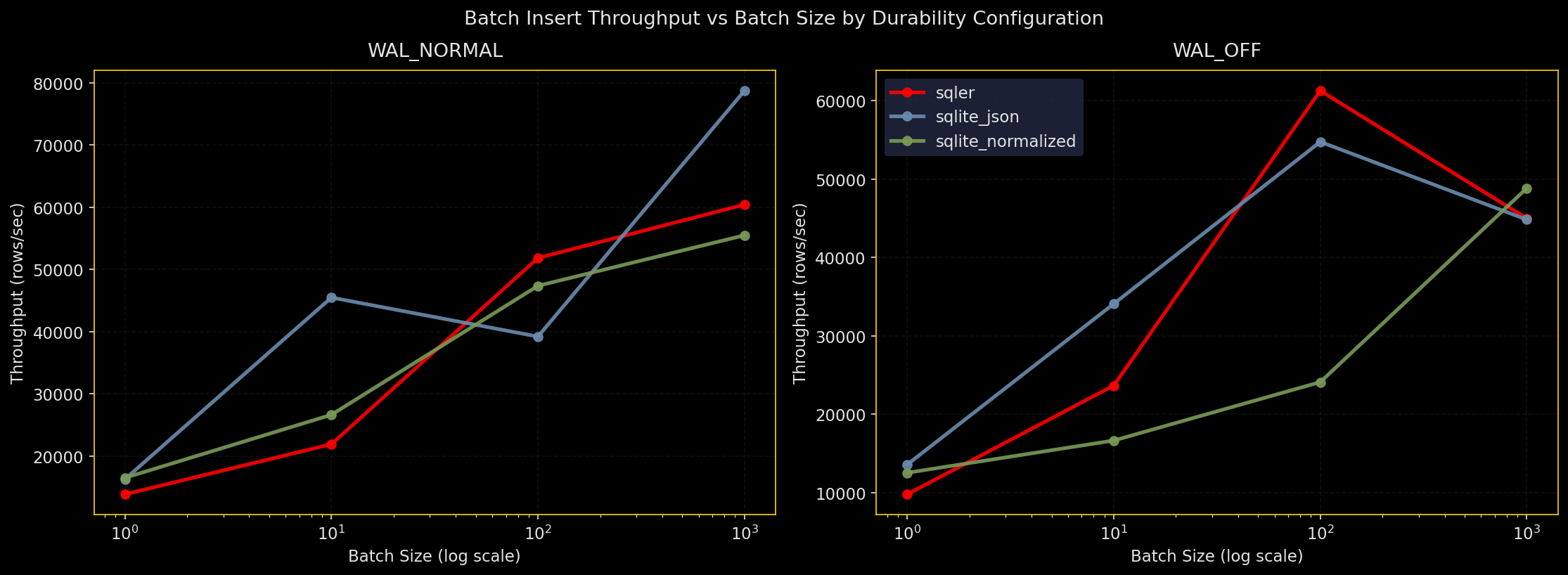

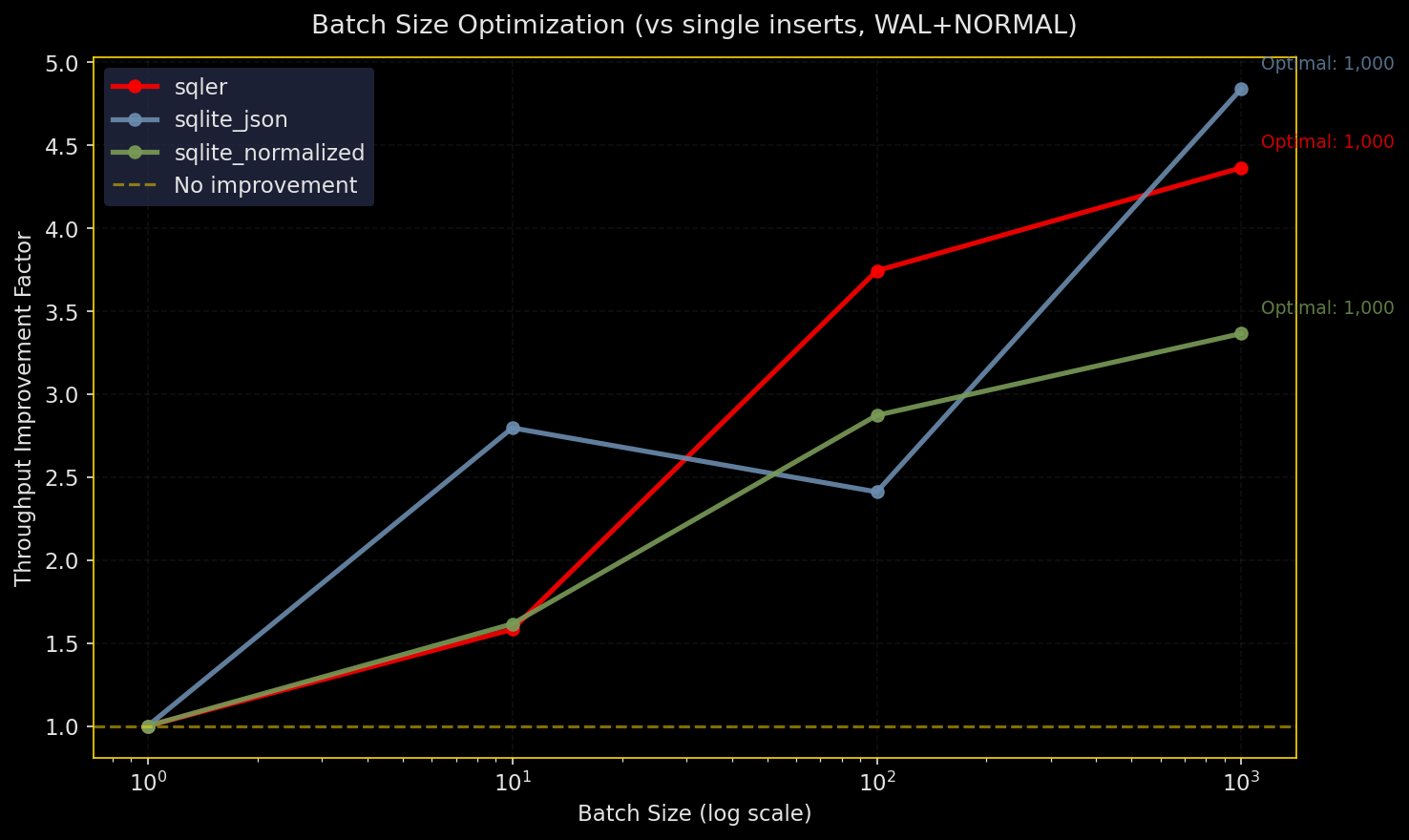
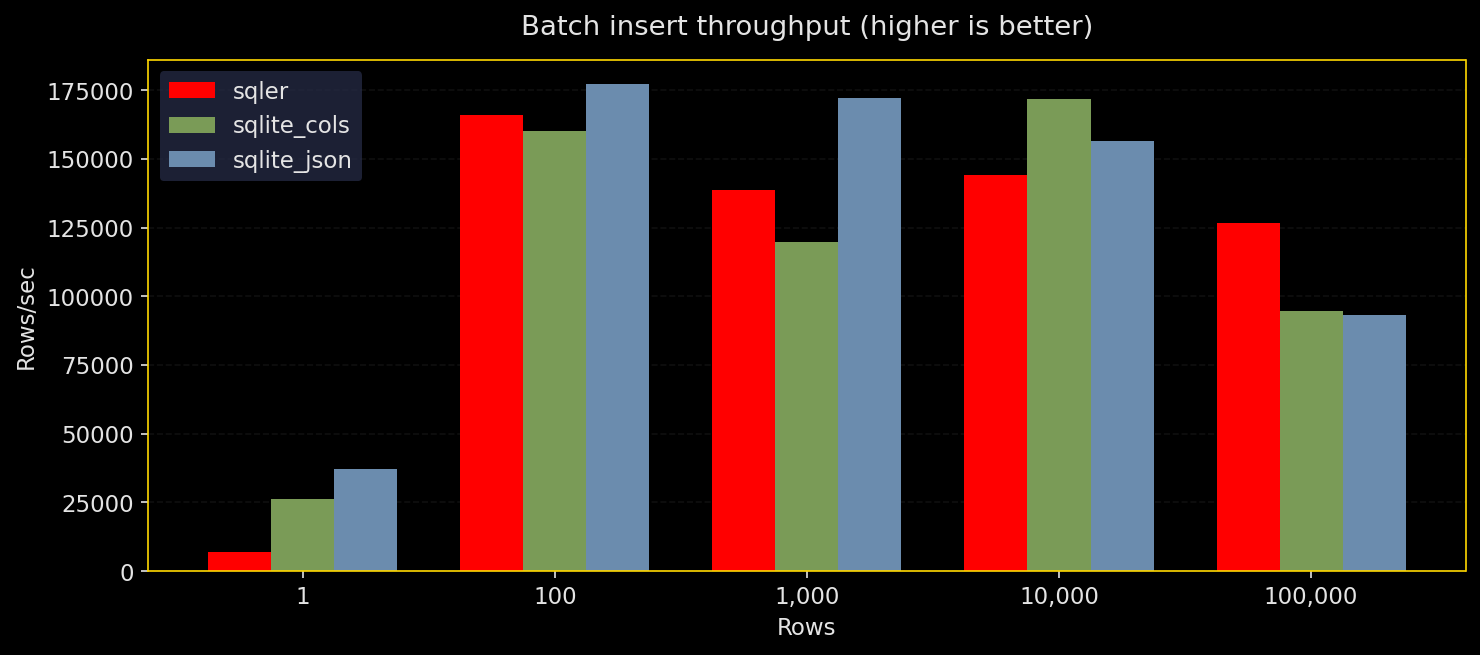
Why test this: Inserts dominate many workloads. Batch size and durability settings matter for throughput.
What it does: Insert N rows via SQLer’s bulk_upsert, raw SQLite JSON (executemany), and normalized columns. Test durability configs: WAL+NORMAL, WAL+FULL, WAL+OFF, DELETE+FULL. Three runs, report throughput and median time.
Results:
- All engines prefer bigger batches
- Raw SQLite JSON edges out slightly on top throughput, SQLer stays close, normalized is competitive
synchronous=OFFis fastest but unsafe;FULLis slowest but safest;WAL+NORMALhits the practical middle ground
SQLer API coverage: Public API for bulk_upsert and create_index. Setup pragmas and table resets used db.adapter.execute() but the hot insert path stays in SQLer’s public API (marked in plots and legends as “sqler+sql”). Production guidance: Use larger batches and WAL+NORMAL for typical throughput with good durability.
# Excerpt from throughput_vs_batch_size.png
for i, config in enumerate(configs):
    ax = axes.flatten()[i]
    cd = df[df["config_name"] == config]
    for engine in sorted(cd["engine"].unique()):
        ed = cd[cd["engine"] == engine]
        ax.plot(ed["batch_size"], ed["throughput"],
                color=ENGINE_COLORS.get(engine, "#666"), linewidth=2.5, marker="o",
                label=engine, alpha=0.9)
    ax.set_xscale("log"); ax.set_xlabel("Batch Size (log)")
    ax.set_ylabel("Throughput (rows/sec)")
Targeted Updates: Selectivity × Depth
Figures:
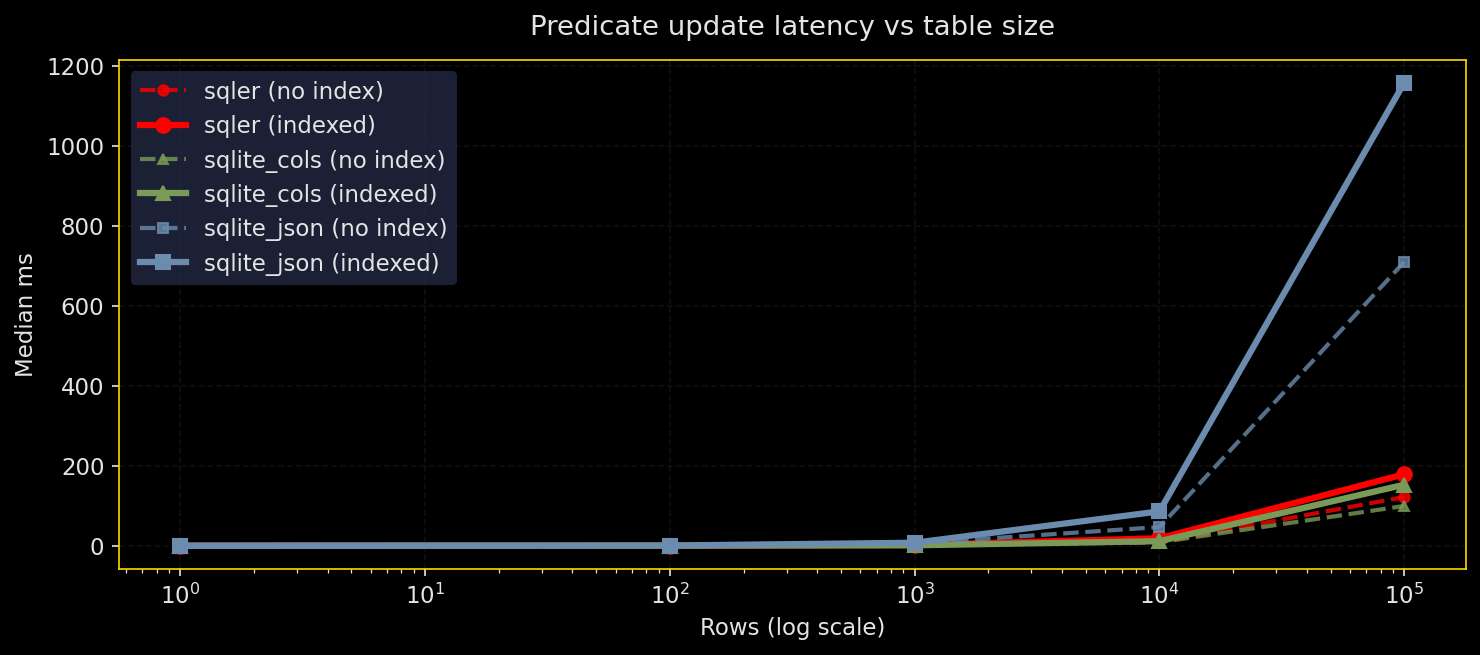
Why test this: Updates are where JSON blobs pay rent. Bulk updates can be painful when you’re rewriting entire JSON documents.
What it does: Update a JSON field with json_set() under different selectivities (0.1% to 50%) and depths (shallow vs deep), with and without indexes on the predicate field. Compare SQLer, raw SQLite JSON, and normalized columns.
Results:
- Low-selectivity updates benefit from predicate indexes across all engines
- Bulk updates (10-50% of rows) favor normalized schemas
- Indexed updates can be slower than non-indexed when many rows change due to index maintenance costs
- SQLer can’t rewrite fewer bytes than SQLite; JSON blob rewrite cost is fundamental
SQLer API coverage: SQLer doesn’t expose clean update syntax yet, so the benchmark used raw SQL via db.adapter.execute() (marked in plots and legends as “sqler+sql”). Data loading and predicate indexes still use public APIs. Production guidance: For frequent broad updates, prefer normalized columns; use predicate indexes for low-selectivity updates.
# Excerpt from latency_vs_selectivity_by_depth.png
for i, depth in enumerate(sorted(df["update_depth"].unique())):
    ax = axes[i]
    dd = df[df["update_depth"] == depth]
    for engine in sorted(dd["engine"].unique()):
        for indexed in [False, True]:
            subset = dd[(dd["engine"] == engine) & (dd["indexed"] == indexed)]
            ls = "-" if indexed else "--"
            label = f"{engine} ({'indexed' if indexed else 'no index'})"
            ax.plot(subset["selectivity"], subset["median_ms"],
                    color=ENGINE_COLORS.get(engine,"#666"),
                    linestyle=ls, marker="o", linewidth=2.5, label=label)
Array Membership: Tags Contains X
Figures:
Why test this: “Find items whose tags include ‘pro’” is classic. JSON makes the ergonomic query easy; the fast query usually needs an auxiliary table with inverted indexes.
What it does: Compare json_each scans over arrays vs auxiliary table with inverted index vs SQLer’s current behavior (maps to scanning). Vary array length (3, 10), selectivity (10%, 50%), table size (10K, 100K).
Results:
- Auxiliary table plus index wins on anything beyond toy sizes
json_eachscanning and current SQLer behavior perform similarly and slower for larger datasets- If array membership queries are frequent, materialize an inverted index
SQLer API coverage: SQLer doesn’t expose a first-class “array membership” operator that compiles to optimal SQL, so the benchmark used raw SQL with json_each (marked in plots and legends as “sqler+sql”). Indexing entire tag arrays is ineffective as expected. Production guidance: If tag/array membership is common, maintain an auxiliary inverted-index table rather than relying on json_each scans.
Aux table (inverted index)
CREATE TABLE user_tags (
  user_id INTEGER NOT NULL,
  tag     TEXT NOT NULL,
  PRIMARY KEY (user_id, tag)
);
CREATE INDEX user_tags_tag_idx ON user_tags(tag);

-- triggers (insert, update, delete) sync user_tags from users.data->$.tags
Auxiliary tables (inverted indexes) map value → document ids so membership checks use simple indexed lookups instead of scanning JSON arrays.
# Excerpt from performance_by_array_length.png
for i, sel in enumerate(sorted(df["selectivity"].unique())):
    ax = axes[i]; sd = df[df["selectivity"] == sel]
    for engine in sorted(sd["engine"].unique()):
        for indexed in [False, True]:
            subset = sd[(sd["engine"]==engine) & (sd["indexed"]==indexed)]
            ls = "-" if indexed else "--"
            label = f"{engine} ({'indexed' if indexed else 'no index'})"
            ax.plot(subset["array_length"], subset["median_ms"],
                    color=ENGINE_COLORS.get(engine,"#666"),
                    linestyle=ls, linewidth=2.5, marker="o", label=label)
Concurrency: Writers Plus Readers
Figures:
Why test this: SQLite allows many readers, one writer. How do writer throughput and reader latency change under contention?
What it does: Preload 50K rows. For fixed duration, run N writers inserting batches and M readers doing equality queries on indexed fields. Record writer throughput and reader latency (median and p95). Test SQLer, raw SQLite JSON, and normalized columns, all with WAL+NORMAL.
Results:
- Writer throughput hits expected limits; single-writer constraint dominates
- Reader latency under load is lowest in SQLer runs, likely thanks to thread-local connection handling plus WAL
- Adding readers and writers shows diminishing returns, not miracles
SQLer API coverage: Public API for SQLerDB setup, bulk_upsert for base data, create_index, and reader queries via SQLerQuery(F("field_0") == value). Setup pragmas and table drops used db.adapter.execute() (marked in plots and legends as “sqler+sql”). Production guidance: Design around SQLite’s single-writer model; use batching, shorter transactions, and WAL to improve reader concurrency.
# Excerpt from writer_throughput_vs_readers.png
for engine in sorted(write_df["engine"].unique()):
    ed = write_df[write_df["engine"] == engine]
    for nw in sorted(ed["num_writers"].unique()):
        subset = ed[ed["num_writers"] == nw]
        ax.plot(subset["num_readers"], subset["throughput"],
                color=ENGINE_COLORS.get(engine,"#666"), marker="o", linewidth=2.5,
                label=f"{engine} ({nw} writer{'s' if nw>1 else ''})", alpha=0.9)
Do These Tests Mean Anything?
Short answer: yes. They’re decision-grade for engineering choices.
Apples-to-apples: Equality filters and batch inserts are clean comparisons across engines.
Intended oranges: Updates compare JSON blob rewrites vs scalar column updates. Not identical work, but the contrast shows exactly what you’re trading.
Not-quite-pure SQLer: Deep JSON paths, array membership, and update statements use adapter.execute(). That doesn’t invalidate results; it highlights API gaps that could be closed to make the “pure API” story complete.
What’s Missing
Make the suite “pure SQLer”:
- Add
db.create_index(table, path="level_0.level_1.field")for deep paths - Make
F([...])compile nested JSON paths everywhereF("field")works - Add
Query.count()andQuery.exists()to avoidlen(q.all()) - Expose
update_where()andset()APIs that compile to efficientjson_set
Array membership ergonomics:
- Provide opt-in helper that maintains auxiliary table (doc_id, tag_value) behind the scenes via triggers for declared array paths
- Ship a
contains()that uses the auxiliary table when present
Chart polish: Switch to a color-blind-safe palette for primary lines, keep current colors as accents, and add p95 bands around the median where feasible.
The results show SQLer behaves predictably within SQLite’s constraints. Expression indexes make JSON queries fast; bulk operations follow expected patterns; concurrency hits SQLite’s single-writer limit. Good enough for production; room for API improvements.
Note: Entries marked “sqler+sql” indicate the test used SQLer for setup/data load but executed the hot query using raw SQL via db.adapter.execute().