
SQLer Featured 
A lightweight, JSON-first micro-ORM for SQLite. Pydantic models stored as JSON documents with fluent queries, FTS5 search, optimistic locking, and 84K rows/sec bulk inserts.
SQLer
A lightweight, JSON-first micro-ORM for SQLite. Define Pydantic models (or lightweight dataclass models), persist them as JSON documents, query with a fluent API. Sync and async.
Why SQLer?
SQLite is the most deployed database on earth, and JSON1 turns it into a document store. SQLer bridges that gap: Pydantic validation with document-style flexibility, a fluent query builder that reaches into nested JSON, and real data integrity — all in a single file, zero-config database.
Good fit: fast prototyping, embedded app state (Electron, CLI tools, mobile), JSON flexibility with Pydantic validation, anything where “working storage in minutes” matters more than distributed SQL.
Quick Start
from sqler import SQLerDB, SQLerModel
from sqler.query import SQLerField as F

class User(SQLerModel):
    name: str
    age: int
    tags: list[str] = []

db = SQLerDB.in_memory()
User.set_db(db)

User(name="Alice", age=30, tags=["admin"]).save()
User(name="Bob", age=25, tags=["user"]).save()

admins = User.query().filter(F("tags").contains("admin")).all()
assert admins[0].name == "Alice"
Models are Pydantic — type hints, validation, and defaults work as expected. Persistence is explicit: .save() returns self with _id attached. Queries compile to JSON-friendly SQL via F() operators.
Two Model Variants
| Variant | Base | Validation | Use Case |
|---|---|---|---|
SQLerModel | Pydantic | Full type coercion + error messages | Production, API layers |
SQLerLiteModel | @dataclass | None (fast, no dependencies) | Browser/WASM, lightweight scripts |
Lite models run in Pyodide/WebAssembly — no Pydantic dependency, no Rust compilation. The query API is identical for both.
from dataclasses import dataclass
from sqler import SQLerDB, SQLerLiteModel

@dataclass
class User(SQLerLiteModel):
    __tablename__ = "users"
    name: str
    age: int
Performance
Real numbers from the benchmark suite (22 scenarios, Python 3.12, SQLite 3.50):
| Operation | Result | Context |
|---|---|---|
| Bulk insert | 84K rows/sec | bulk_upsert() at 10K rows |
| Index speedup | 470x | 9.4ms → 0.02ms with create_index() |
| Cache hit | 7,000x | 14ms → 0.002ms with @cached_query |
| FTS search | 0.28ms | Sub-millisecond across all dataset sizes |
| Bulk vs single | 5.3x | bulk_upsert vs save() loop at 10K |
| Lite models | 1.3x | Dataclass variant vs Pydantic overhead |
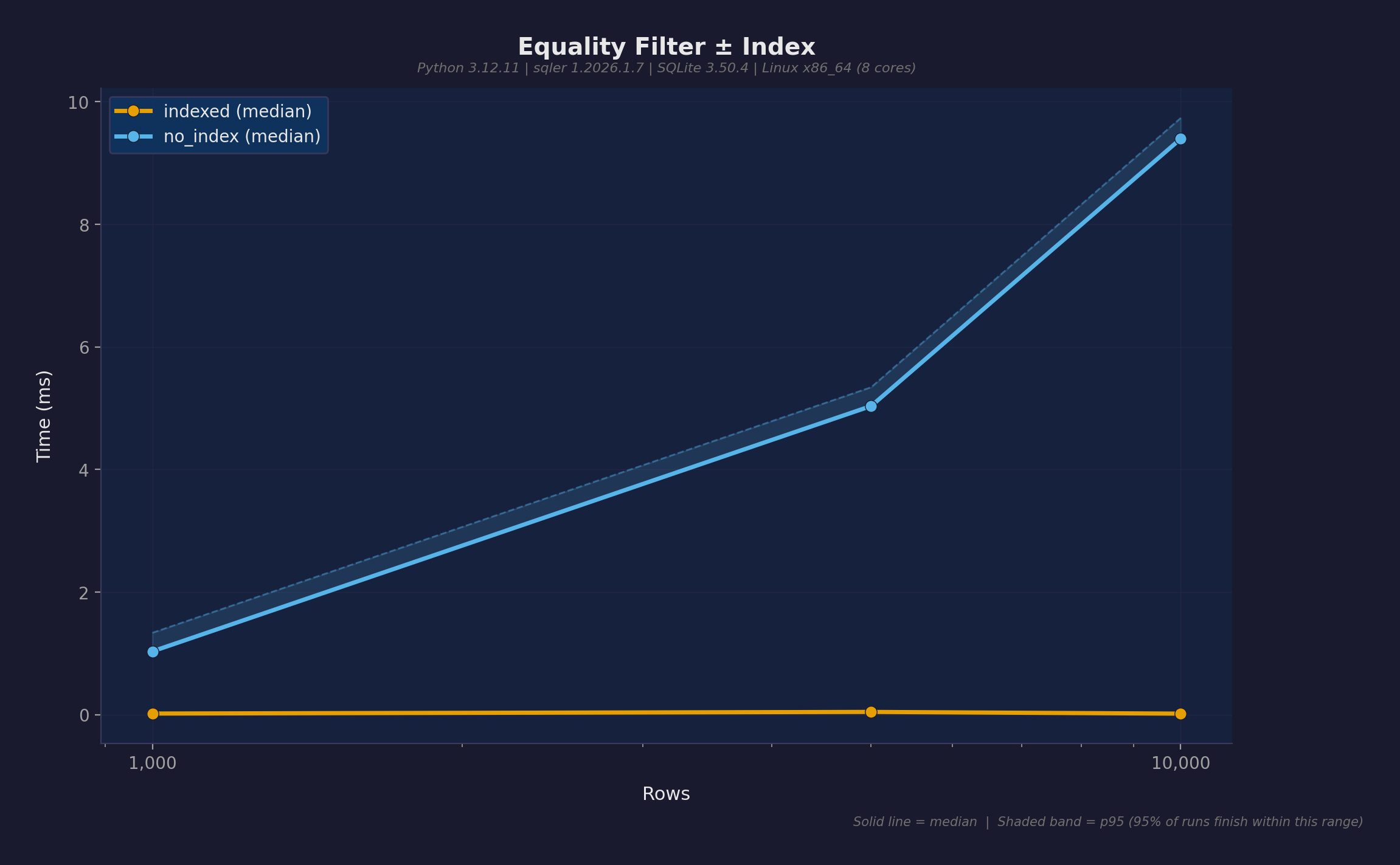
The single most important optimization: index your query predicates. db.create_index("table", "field") creates an expression index on the JSON path. Indexed queries flatline at ~0.02ms regardless of table size.
Features
Query Builder
Fluent filters over nested JSON with F() operators:
# Equality, comparison, ordering
User.query().filter(F("age") > 30).order_by("name").all()

# Nested field access
User.query().filter(F("address")["city"] == "Kyoto").all()

# Array operations
Order.query().filter(F(["items"]).any().where(
    (F("sku") == "RamenSet") & (F("qty") >= 2)
)).all()

# Containment, membership, exclusion
User.query().filter(F("tags").contains("admin")).all()
User.query().filter(F("tier").isin([1, 2])).all()
User.query().exclude(F("name").like("test%")).all()
Also: between, is_null, is_not_null, startswith, endswith, glob, or_filter, distinct_values, paginate.
Relationships
References stored as { "_table": "addresses", "_id": 1 } hydrate to model instances on load:
class User(SQLerModel):
    name: str
    address: Address | None = None

loaded = User.from_id(user._id)
assert loaded.address.city == "Kyoto"  # auto-hydrated

kyoto_users = User.query().filter(
    User.ref("address").field("city") == "Kyoto"
).all()
Optimistic Locking
SQLerSafeModel tracks _version per record. Concurrent modifications raise StaleVersionError:
from sqler import SQLerSafeModel, StaleVersionError

class Account(SQLerSafeModel):
    owner: str
    balance: int

try:
    account.save()
except StaleVersionError:
    account.refresh()  # reload from DB, then decide
Referential Integrity
Deletion policies without database constraints:
restrict— block delete when referencedset_null— clear referencing fields before deletecascade— delete dependents recursively
author.delete_with_policy(on_delete="cascade")
validate_references() finds orphaned references that slipped through.
Full-Text Search
FTS5-backed search with ranking and highlights:
from sqler import FTSIndex

fts = FTSIndex(Article, fields=["title", "content"])
fts.create(db)
fts.rebuild()

results = fts.search("Python")          # 0.28ms at any scale
ranked = fts.search_ranked("Python")    # with BM25 relevance scores
snippets = fts.search_highlights("Python")  # with highlighted excerpts
Sync and Async
Parallel APIs with matching semantics. Prototype in sync, migrate to FastAPI without rewrites:
from sqler import AsyncSQLerDB, AsyncSQLerModel

async def main():
    db = AsyncSQLerDB.in_memory()
    await db.connect()
    # Same query API, just awaited
Production Features
| Feature | Description |
|---|---|
bulk_upsert() | Batch inserts at 84K rows/sec |
@cached_query | TTL-based result caching with LRU eviction |
MetricsCollector | Prometheus/StatsD export for query monitoring |
PooledSQLerDB | Thread-safe connection pooling with WAL |
| Export/import | CSV, JSON, JSONL (sync + async) |
| Schema migrations | add_field(), remove_field(), rename_field() |
| Change tracking | is_dirty(), get_dirty_fields(), TrackedModel |
| Transaction-aware saves | model.save() inside with db.transaction(): rolls back properly |
Interactive Tours
11 browser-based marimo notebooks — run and modify code directly, no install needed:
| Tour | Topics |
|---|---|
| 01. Fundamentals | Models, CRUD, queries, aggregations |
| 02. Relationships | References, hydration, cross-model queries |
| 03. Safe Models | Optimistic locking, conflict resolution |
| 04. Transactions | Atomic operations, rollback |
| 05. Mixins | Timestamps, soft delete, lifecycle hooks |
| 06. Advanced | Bulk ops, indexes, integrity, raw SQL |
| 07. Export/Import | CSV, JSON, JSONL |
| 08. Full-Text Search | FTS5, boolean queries, ranking |
| 09. Change Tracking | Dirty checking, change detection |
| 10. Database Ops | Health checks, stats, vacuum, logging |
| 11. Metrics & Caching | Prometheus metrics, query caching, pools |
All 11 run in-browser via Pyodide/WASM using Lite models. Full Pydantic versions available locally with uv run marimo edit examples/tour_01_fundamentals.py.
Honest Limitations
- Single writer — SQLite’s architecture. Use
bulk_upsertand transactions to batch writes. - JSON overhead — Fields extracted via
json_extract(), not native columns. Indexes close the gap. - No JOINs — Relationships use reference hydration, not SQL JOINs. Fine for typical document patterns.
- Memory-bound — Large result sets materialize in Python. Use
paginate()andcount()to limit.
Getting Started
pip install sqler # or: uv add sqler
Python 3.12+ · SQLite with JSON1 (bundled on most platforms).
uv run pytest -q                 # 548 tests
uv run python -m benchmarks run  # 22 benchmark scenarios
日本語版: このプロジェクトを日本語で読む